HouseGpts LogoHouseGpts
2
Credits

AI Kitchen Designer 📐 - Design & Generate Kitchen Designs

AI Kitchen Designer: Render & Generate Designs For Kitchen in less than 30 seconds.

Upload Image

Design Options

0/300

Premium users can generate images without watermark

Higher quality options available for premium users

2 credits remaining

AI Kitchen Designer: Transform Your Kitchen in Seconds (2026)

Upload a photo of your existing kitchen and watch as AI generates stunning redesigns instantly. Perfect for homeowners, renters, and designers planning kitchen renovations without expensive consultations.

Try Free Kitchen Designer →

No credit card required • Get 2 free designs

Real Kitchen Transformations: Before & After

See how our AI kitchen designer transformed this outdated 2000s kitchen into a modern, bright space. Notice the dramatic changes in lighting, cabinetry, and overall atmosphere.
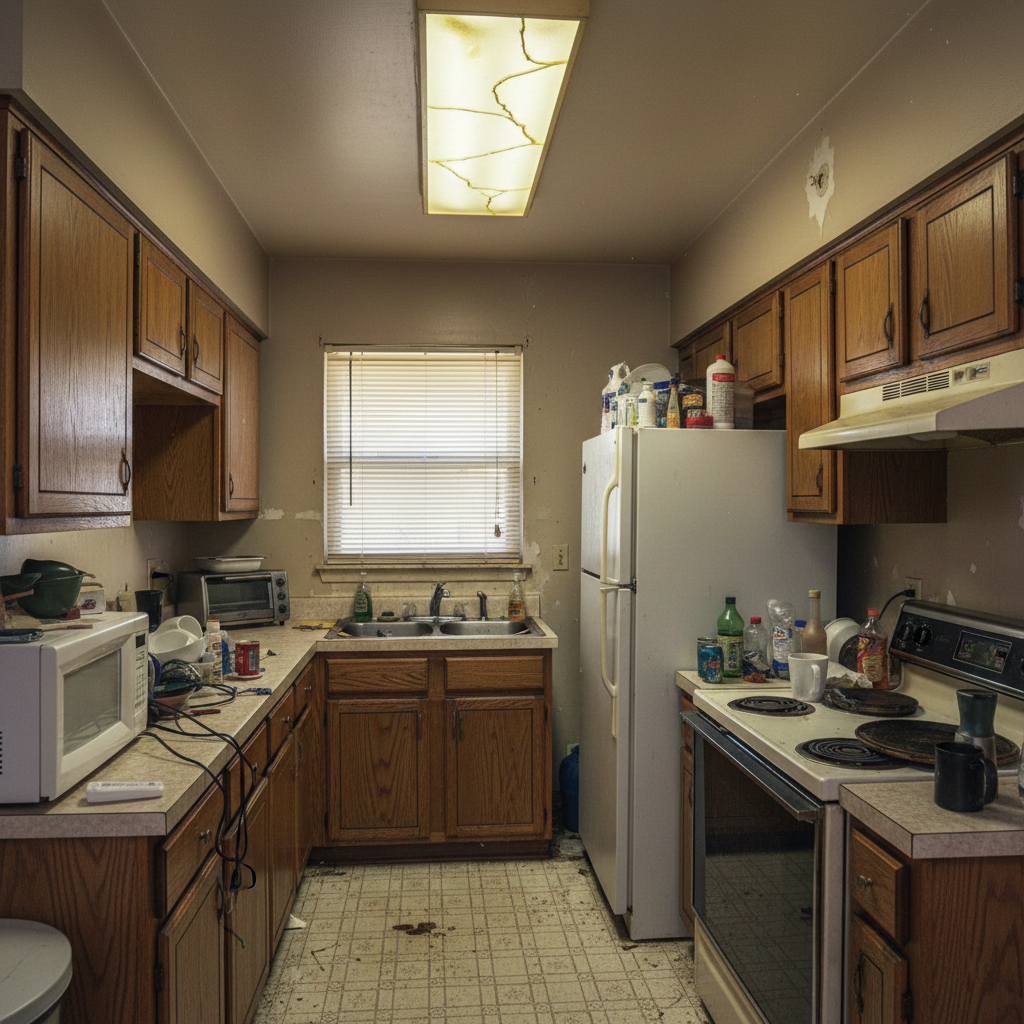
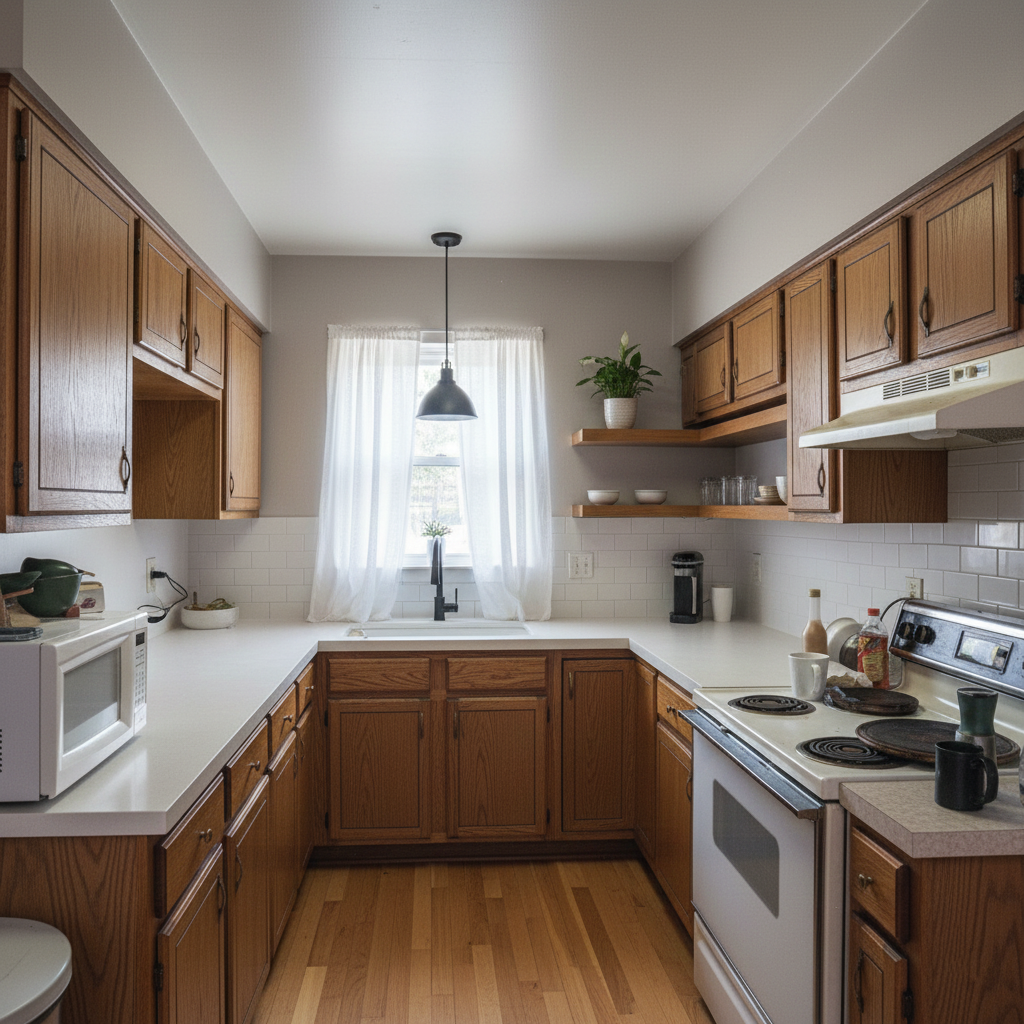
Outdated kitchen with old oak cabinets, worn countertops, and poor lighting before AI redesign
Before: Dated oak cabinets, laminate countertops, fluorescent lighting
Modern kitchen with white cabinets, marble countertops, and LED lighting after AI kitchen design
After: Modern white cabinets, marble waterfall island, recessed LED lighting

What Changed in This Kitchen Redesign:

  • ✓ Old oak cabinets replaced with sleek white shaker cabinets
  • ✓ Worn laminate countertops upgraded to white marble with grey veining
  • ✓ Outdated fluorescent lighting transformed with modern recessed LEDs
  • ✓ Linoleum flooring replaced with light oak hardwood
  • ✓ Added waterfall island as focal point
  • ✓ Updated to matte black fixtures and brass hardware

What Is an AI Kitchen Designer?

An AI kitchen designer is an artificial intelligence-powered tool that helps you visualize kitchen remodel ideas without hiring an expensive interior designer. Simply upload a photo of your current kitchen, choose your preferred style (modern, farmhouse, industrial, etc.), and the AI generates photorealistic redesigns in seconds.

Unlike traditional kitchen design software that requires technical skills, AI kitchen designers are incredibly user-friendly. The technology uses advanced computer vision and generative AI to understand your existing space and apply professional design principles automatically.

Whether you're planning a complete kitchen renovation, exploring design ideas as a renter, or a real estate agent staging properties, AI kitchen design tools provide instant visualization at a fraction of the cost of traditional design consultations (which typically range from $2,000-$5,000).

How to Use the AI Kitchen Designer (Step-by-Step)

Step 1: Upload Your Kitchen Photo

Take a clear photo of your current kitchen from a corner angle showing as much of the space as possible. Natural lighting works best. The AI works with any kitchen size - from small apartment galleys to large open-concept spaces.

Step 2: Choose Your Kitchen Design Style

Select from 20+ popular styles like Modern, Scandinavian, Farmhouse, Industrial, Traditional, or Contemporary. Not sure? Try multiple styles to see which resonates with your vision.

Step 3: Add Specific Requirements (Optional)

Want white cabinets? Prefer a kitchen island? Need more storage? Add custom instructions like "add waterfall island", "white shaker cabinets", or "maximize natural light".

Step 4: Generate & Download

Click generate and wait 20-30 seconds. The AI will produce photorealistic design variations. Download your favorites to share with contractors, family, or use as renovation inspiration.

Ready to Redesign Your Kitchen?

Start Free Kitchen Design →

Popular Kitchen Design Styles for 2026

Our AI kitchen designer supports all major kitchen styles. Here are the most requested designs:

Modern Kitchen Design

Clean lines, minimal hardware, neutral colors (white, grey, black), sleek appliances, and plenty of natural light. Perfect for contemporary homes.

Scandinavian Kitchen

Light wood cabinets, white walls, minimal decor, functional design, and emphasis on natural materials. Ideal for small spaces.

Farmhouse Kitchen

Rustic charm with shaker cabinets, apron-front sinks, open shelving, vintage-inspired hardware, and warm wood tones.

Industrial Kitchen

Exposed brick, metal fixtures, concrete countertops, open shelving, Edison bulbs, and a mix of raw materials for urban loft vibes.

💡 Not sure which style fits your space? Try our AI kitchen designer with different styles and compare results instantly.

AI Kitchen Designer vs Traditional Kitchen Designer

FactorAI Kitchen DesignerTraditional Designer
CostFree - $39/month$2,000-$5,000+ per project
Speed20-30 seconds2-4 weeks
RevisionsUnlimited & instantLimited, $200-300 each
Best ForQuick visualization, budget projects, DIY, trying stylesComplex renovations, custom builds, construction drawings
FlexibilityTry 20+ styles instantlyLimited by designer's style preferences

When to use AI: For initial visualization, exploring multiple styles quickly, budget-friendly projects, or as a starting point before hiring a professional. Read more: AI vs Human Designer Comparison

When to hire a traditional designer: For complex structural changes, custom cabinetry, high-end luxury kitchens, or when you need contractor coordination and project management.

Who Should Use an AI Kitchen Designer?

🏠 Homeowners Planning Renovations

Visualize your dream kitchen before spending thousands on contractors. Test different cabinet colors, layouts, and styles to make confident decisions.

🏢 Real Estate Professionals

Show potential buyers what a property could look like with an updated kitchen. Virtual staging increases perceived home value by 5-15%.

🎨 Interior Designers & Architects

Speed up client presentations by generating multiple design concepts quickly. Use AI as a starting point, then refine with your professional expertise.

🔑 Renters Exploring Design Ideas

Dream about what your rental kitchen could look like without making permanent changes. Perfect for inspiration and understanding your style preferences.

💰 Budget-Conscious DIYers

Plan affordable kitchen updates by visualizing changes before buying materials. Avoid costly mistakes by seeing designs before committing.

AI Kitchen Design by Kitchen Size & Layout

Our AI kitchen designer works with any kitchen size or layout. Here's how to optimize each type:

Small Kitchen Design Ideas

For kitchens under 100 sq ft, focus on light colors, reflective surfaces, and smart storage. AI can help you visualize: white cabinets to maximize light, floating shelves for openness, and compact appliances.

Galley Kitchen Redesign

Galley kitchens (two parallel walls) benefit from streamlined design. Try light-colored cabinets on both sides, under-cabinet lighting, and a mirror or glass backsplash to create the illusion of width.

L-Shaped Kitchen Layouts

L-shaped kitchens are perfect for open-concept homes. AI can show you how to add a kitchen island, optimize the corner space, and create a natural flow between cooking and dining areas.

U-Shaped Kitchen Ideas

U-shaped kitchens offer maximum counter space. Visualize three walls of cabinets, peninsula seating, and how to avoid making the space feel closed-in with proper lighting and color choices.

Transform Your Kitchen Today with AI

Join 78,000+ homeowners who've used our AI kitchen designer to visualize their dream kitchen. Get started free - no credit card required.

Start Designing Your Kitchen Free →

✓ 2 free designs • ✓ No credit card • ✓ Results in 30 seconds

Explore More AI Design Tools

Related Kitchen Design Guides

Frequently Asked Questions About AI Kitchen Design

Everything you need to know about using AI to design your kitchen.

What is an AI kitchen designer?

An AI kitchen designer is a tool that uses artificial intelligence to transform photos of real kitchens into professional redesigns in 20-30 seconds. Upload a photo, choose a style (modern, farmhouse, scandinavian, etc.), and get photorealistic visualizations showing different cabinets, colors, layouts, and finishes. It helps homeowners, designers, and real estate agents visualize kitchen renovations before spending money on contractors.

How does an AI kitchen designer work?

AI kitchen designers use computer vision to analyze your kitchen photo, understanding the layout, proportions, and existing features. Advanced generative AI then applies your chosen design style while preserving the room's structure. The AI considers professional design principles like color harmony, material compatibility, and lighting to create photorealistic kitchen redesigns. Results are generated in 20-30 seconds instead of the 2-4 weeks traditional designers require.

Is AI kitchen design accurate?

Yes. AI kitchen designers are highly accurate for visualizing aesthetic changes like cabinet styles, colors, countertops, backsplashes, and lighting. They preserve your room's actual dimensions and layout. However, AI cannot verify structural feasibility, plumbing constraints, or building codes. Use AI for design visualization and style exploration, then work with licensed contractors to validate what's buildable and get accurate cost estimates.

How much does AI kitchen design cost?

HouseGPTs offers 2 free AI kitchen designs with no credit card required. Paid plans start at $39/month for unlimited designs with premium features. This saves $2,000-$5,000 compared to traditional kitchen designer consultations, which typically charge $2,500-$3,500 for initial concepts plus $200-300 per revision.

Can I use AI kitchen designs with my contractor?

Absolutely. Contractors appreciate clear visual references. Download your AI-generated kitchen designs and share them with contractors during consultations. Many homeowners report getting more accurate quotes because contractors can see exactly what you want instead of interpreting vague descriptions. Use AI designs as inspiration and reference, then work with contractors for construction drawings and implementation.

What kitchen styles can AI create?

AI kitchen designers support 20+ styles including Modern, Contemporary, Scandinavian, Farmhouse, Industrial, Traditional, Mid-Century Modern, Coastal, Transitional, Rustic, Minimalist, Luxury, Mediterranean, Cottage, and more. You can test multiple styles on the same kitchen photo to compare options and find what works best for your space and preferences.

Does AI work for small kitchens?

Yes. AI kitchen designers work exceptionally well for small kitchens, galley kitchens, apartment kitchens, and compact spaces. The AI can visualize space-saving solutions like light colors to maximize brightness, smart storage solutions, optimal layouts, and design tricks that make small kitchens feel larger. Many users specifically use AI to solve small kitchen design challenges.

How long does AI kitchen design take?

Most AI kitchen designs are generated in 20-30 seconds after uploading your photo and selecting preferences. You can create and compare multiple design variations in minutes, whereas traditional designers typically take 2-4 weeks to deliver initial concepts. This speed allows you to explore dozens of options quickly and make confident design decisions.

Do I need design skills to use AI kitchen designer?

No design experience required. AI kitchen designers are built for homeowners, not professional designers. Simply upload a photo, choose a style you like from the options (modern, farmhouse, etc.), and the AI handles all the complex design work automatically. The interface is point-and-click simple. If you can upload a photo and click a button, you can use AI kitchen design.

Can AI design different kitchen layouts (galley, L-shaped, U-shaped)?

Yes. AI kitchen designers work with all kitchen layouts including galley kitchens, L-shaped, U-shaped, one-wall, open-concept, and irregular layouts. The AI preserves your existing layout while transforming the aesthetic elements (cabinets, colors, materials, lighting). For layout changes, use AI to visualize the end result, then consult with contractors about feasibility and structural requirements.

Is AI kitchen design better than hiring a designer?

AI and human designers serve different purposes. AI is better for: quick visualization (seconds vs weeks), exploring multiple styles affordably, budget projects under $15,000, and initial design exploration. Human designers are better for: complex structural changes, custom cabinetry, contractor coordination, construction drawings, and high-end projects over $50,000. Many people use AI first to develop their vision, then hire designers for implementation.

What photo should I upload for best results?

For best AI kitchen design results, upload a clear, well-lit photo showing as much of your kitchen as possible. Take the photo from a corner angle during daytime with natural light. Include all major elements: cabinets, countertops, appliances, windows, and flooring. Avoid extreme angles or very dark photos. The clearer your input photo, the more accurate and realistic your AI-generated designs will be.

Can I add custom requirements like 'white cabinets' or 'add island'?

Yes. Most AI kitchen designers including HouseGPTs allow custom requirements. You can specify details like 'white shaker cabinets', 'marble countertops', 'add waterfall island', 'maximize natural light', 'subway tile backsplash', or any other specific preferences. The AI incorporates these requirements into the generated design while maintaining the overall style coherence.

AI Kitchen Designer — Free Online Kitchen Redesign Tool

HouseGPTs AI Kitchen Designer transforms photos of real kitchens into professional redesigns in 20–30 seconds. Upload a photo of your kitchen, choose a style — Modern, Farmhouse, Scandinavian, Industrial, or 20+ more — and get a photorealistic result you can show to kitchen fitters, designers, and family members immediately.

  • 20+ kitchen styles — Modern, Farmhouse, Scandinavian, Industrial, Transitional, and more
  • Cabinet colours, countertops, backsplash, and hardware all redesigned in one go
  • Kitchen layout preserved — no structural changes, just the aesthetic
  • Works for any kitchen size and layout — galley, L-shape, U-shape, open plan
  • Download results to use as kitchen fitter briefs or retailer references
  • Free to try — 2 designs free, no credit card required

Why Homeowners Use AI Before Starting a Kitchen Refit

A kitchen refit is typically the single largest home improvement investment — averaging $15,000–$50,000 depending on scope. The biggest source of dissatisfaction after a refit is a mismatch between what was imagined and what was installed. AI kitchen design closes that gap by showing you exactly what the finished kitchen will look like before any cabinets are ordered.

Contractors and kitchen fitters also benefit: homeowners who bring AI renders to consultations get more accurate quotes, fewer scope changes, and faster sign-off on designs. The 30-second investment pays back in weeks of reduced project friction.

Who Uses This Tool

🍳

Pre-refit planning

See your new kitchen before ordering a single cabinet — reduce expensive change-of-mind costs during installation.

🤝

Kitchen fitter briefs

Bring a photorealistic render to your first fitter consultation — get more accurate quotes and faster alignment.

🏡

Real estate value

A kitchen redesign is the highest-ROI home improvement. See the visual transformation before committing.

How to Use the Tool — 4 Steps

1

Upload Your Photo

Take a clear photo of your kitchen in good natural light. A corner angle showing the full space works best. The AI processes any standard photo — JPEG, PNG, or WEBP, up to 10MB.

2

Choose Your Style

Browse the style options and select the one closest to your vision. If you're unsure, pick two or three and generate each to compare. You can also use the custom prompt field to describe specific requirements.

3

Select Your AI Model

Choose an AI model based on your needs. Quick Restyle (2 credits) is great for fast exploration. HD Studio (5 credits) suits client presentations. Ultra Pro (7 credits) produces photorealistic output for high-stakes decisions.

4

Generate and Download

Click Generate and wait 20–40 seconds. Download your design in full resolution to share with contractors, designers, family members, or use as a shopping reference. Generate more variants to compare before deciding.

💡 Pro Tips for Better Results

1

Stand in the corner of your kitchen nearest the window and photograph the full room — natural light produces the best results.

2

Specify your preferred countertop material in the requirements box — marble, quartz, and butcher block create very different feels.

3

Generate 3–5 style variants and shortlist before showing family members — it's easier to choose from 3 than from 20.

Frequently Asked Questions

How accurate is the AI kitchen design result?
HouseGPTs AI Kitchen Designer is highly accurate for aesthetic changes — cabinet styles, colours, countertops, backsplash, and lighting. It's not designed for structural changes like moving plumbing or load-bearing walls. Use AI renders for aesthetic planning and style direction.
What kitchen styles does HouseGPTs support?
HouseGPTs supports 20+ kitchen styles including Modern, Contemporary, Scandinavian, Farmhouse, Industrial, Traditional, Mid-Century Modern, Coastal, Transitional, Rustic, Minimalist, Luxury, Mediterranean, Cottage, and more.
Can I use the AI kitchen design with my kitchen fitter?
Yes — and we recommend it. Download your AI render and bring it to the first fitter consultation. Homeowners who bring visual references get more accurate quotes, faster design sign-off, and fewer costly scope changes during installation.
Is HouseGPTs AI Kitchen designer free?
Yes — HouseGPTs gives you 2 free kitchen design generations with no credit card required. Paid plans start at $39/month for unlimited designs with premium quality and no watermark.
How long does an AI design take to generate?
Most designs are generated in 20–40 seconds depending on the model selected. The Quick Restyle model is fastest (10–20 seconds). The Ultra Pro model produces the highest quality results and takes 30–60 seconds.
Do I need design experience to use HouseGPTs?
No design experience is needed. Upload a photo, select a style, and click generate. The AI handles all the design decisions automatically. If you have specific requirements, use the optional text field to add instructions.
What photo should I upload for best results?
Take a clear photo showing as much of the space as possible. Natural daylight lighting produces the best results. Avoid photos taken at night or in low light.
Can I download my AI-generated designs?
Yes. All generated designs can be downloaded in full resolution. Subscriber designs come without a watermark. Free tier designs include a small HouseGPTs watermark.

Ready to Try It?

2 free designs — no credit card, no sign-up required.

Start Designing for Free →